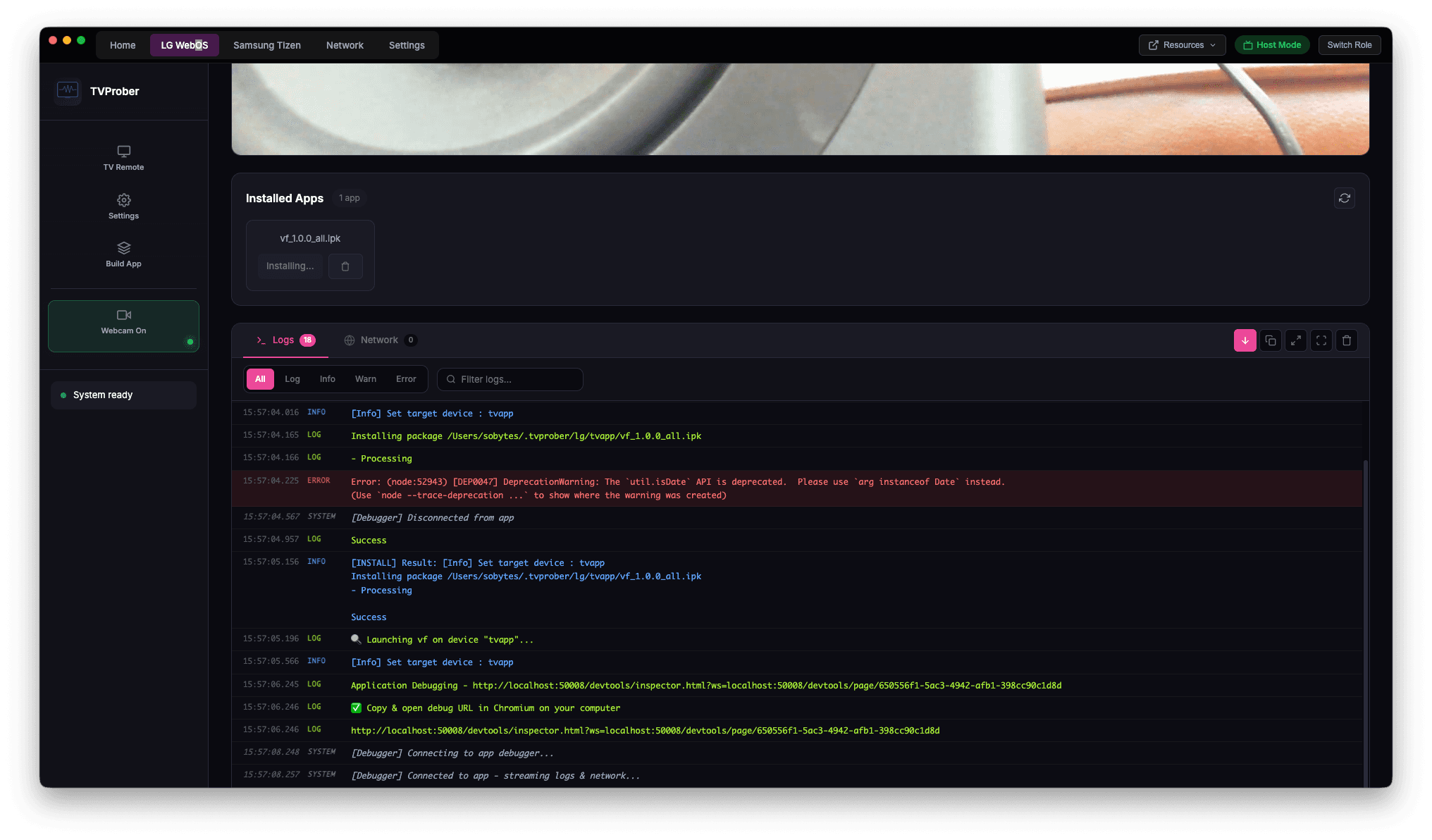
TVProber is a cross-platform desktop application built for developers who build, test, and debug apps on LG WebOS and Samsung Tizen Smart TVs. Connect to any TV on your network, deploy apps, inspect live sessions, and stream your webcam feed — all from a single interface.
No more standing in front of the TV. No more shared office setups. Debug Smart TV apps remotely from anywhere in the world.
Key Features
- Remote Control & Navigation — Control your LG WebOS or Samsung Tizen TV with a full virtual remote. Send key presses, navigate menus, launch apps, and power on/off. Wake-on-LAN support means you can turn on TVs remotely without lifting a finger.
- One-Click App Deployment — Build and deploy your TV app with a single click. Paste a web app URL or upload an IPK/WGT package, and TVProber handles the packaging, installation, and launch on the target TV.
- Live WebRTC Webcam Streaming — Stream a live webcam feed directly to your Smart TV over WebRTC. TVProber bundles MediaMTX and FFmpeg for ultra-low-latency video streaming with hardware-optimised H.264 encoding.
- Built-in Web Inspector & Debugger — Launch the Chrome DevTools inspector for your TV app directly from TVProber. Debug JavaScript, inspect DOM elements, monitor network requests, and profile performance.
- Secure Remote Access via ZeroTier — Connect to Smart TVs anywhere in the world using ZeroTier VPN. Built-in network management lets you join networks, view peers, and monitor connections without leaving the app.
- TV Discovery & Auto-Detection — TVProber automatically discovers LG and Samsung TVs on your local network. No manual IP configuration required.
Multi-Platform TV Support
- LG WebOS — Full support via WebOS CLI tools. App installation, launch, inspect, and SSH access.
- Samsung Tizen — Full support via SDB (Smart Development Bridge). App deployment, debugging, and device management. SDB is bundled with the app.
How It Works
- Install TVProber on your Mac (Apple Silicon or Intel)
- Connect your TV — TVProber discovers TVs on your local network or connect remotely via ZeroTier
- Deploy your app — paste a URL or upload a package, one click to install and launch
- Debug remotely — use the built-in web inspector, virtual remote, and webcam feed
- Collaborate — share your session URL with your team over ZeroTier
Technical Architecture
- Desktop App: Electron with embedded Express server
- Webcam Streaming: MediaMTX (RTSP/WebRTC/HLS/SRT) + FFmpeg with H.264 baseline profile
- WebRTC Protocol: WHEP (WebRTC-HTTP Egress Protocol) for browser-native video playback
- Video Encoding: libx264 ultrafast preset, zerolatency tune, 2Mbps bitrate
- LG Integration: WebOS CLI tools (ares-setup-device, ares-install, ares-launch, ares-inspect)
- Samsung Integration: SDB (Smart Development Bridge) — bundled with the app
- Remote Networking: ZeroTier peer-to-peer VPN with built-in network management
- Code Signing: Apple Developer ID signed and notarised for macOS Gatekeeper
Use Cases
- Smart TV App Development — Build and test LG WebOS and Samsung Tizen apps without standing in front of the TV
- Remote QA Testing — QA teams can test TV apps from anywhere in the world via ZeroTier
- Live Demos & Presentations — Stream your webcam to a TV for remote video presentations
- Multi-Device Testing — Test your app across different TV models and firmware versions from one workstation
- Agency & Client Work — Deploy and debug TV apps on client hardware remotely
Download
- Apple Silicon (M1/M2/M3/M4) — TVProber-mac-arm64.dmg
- Intel (x64) — TVProber-mac-x64.dmg
Windows and Linux builds coming soon.